Toolblox Spec
Toolblox Spec is a textual representation of a smart-contract workflow which helps to communicate its contents with stakeholders as well as use the import/export functionality in Toolblox.
The Toolblox Spec is a standard used to describe a workflow, specifically in the context of smart contracts. The Toolblox Spec includes the structure and syntax for defining the states, transitions, and actions of a workflow, as well as any clauses or functions that may be needed to facilitate the execution of the workflow. Each of these workflow specifications includes the states, transitions, and actions specific to their respective processes, as well as any clauses or functions needed to facilitate the execution of the workflow.
The Toolblox Spec is used as a standard for defining and implementing smart contract workflows in a variety of contexts, helping to ensure consistency and clarity in the specification and execution of these processes.
Benefits
- Human-readable. Communicate contract flow with co-workers or partners via chat, email or other text-based mediums.
- Integrations. Integration with AI chatbots such as GPT
- Import/export/backup/clone. Easily transportable or savable as text document, email etc.
- Integrity verification. Being able to verify that a contract on the chain does perform what it supposes to do. One can always run ‘Spec -> to smart contract code -> to bytecode’ transformation and compare it to the one deployed on the chain.
- Universal ABI (Application Binary Interface). Standardized serialization of smart contracts instead of using a fragmented approach (each blockchain might have its own ABI format).
Spec definition
The smart contract definition language (Toolblox Spec) is a language used to define smart contracts in a standardized way. It consists of a set of rules and syntax for specifying the various components of a smart contract, including the project name, object name, currency, attributes, states, transitions, and actions. The Spec allows to create smart contracts that are clear, concise, and easy to understand, and it helps to ensure that contracts are executed consistently and correctly. Some of the key features of the Spec include:
- Support for various data types, including integers, strings, booleans, and addresses
- The ability to specify restrictions on access to certain functions or states
- The ability to define custom validation rules for transitions
- The ability to call external functions or flows from within a contract
- The ability to set property values using calculations
- The ability to make payments or transfer funds within a contract
- The ability to trigger events or log data to the blockchain.
The official definition for the Toolblox Spec is as follows:
/*
 * Legend:
 * [] - these brackets indicate optional parts
 * {} - these brackets indicate mandatory input
 * [,...n] - indicates possible repeat of the previous section and the delimiter (comma in this case)
 * | - pipe splits equally possible inputs (variants)
 * All other symbols (like equal signs, less than sign, larger than sign), brackets (like normal brackets), quotation marks (like '), and delimeters (commas, semicolons) are MANDATORY.
 * semicolons (;) are used to split sections (header, properties, states, transitions) and each transition.
 * Do NOT omit quotation marks around 'from_state_name' and 'to_state_name'.
 */

{ project_name } : { object_name } : [ symbol ] : [ interface [ ,...n ] ] ;

[ Currency: { currency_name },{ currency_symbol },{ currency_contract_address }; ]

Id : integer(),
Status : integer(),
Name : string(),
[ { attribute_name } : { string | integer | money | address | restrictedaddress | enum | float | date | image | blob | boolean | addressinfo | addressandpersoninfo | fk | timestamp }([enumvalues={ enum_value }[ |...n ] | notnull=yes | transient=yes | fk={ other_flow_url } ])] [ ,...n ] ;

{ state_id }:{ state_name }:[{ owner_property_name }] [ ,...n ] ;

-- If 'from_state_name' is empty it will become a transition to create (mint) an object.
'[ from_state_name ]' => '{ to_state_name }' : { transition_name } ( [ { transition_parameter_name } ] [ ,...n ] )
    [
        -- Assert_access adds constraint to check if executor is correct. If no user set, then it sets the user to the currently caller (sender).
        + ASSERT_ACCESS( restricted={ address_type_property_name } | flow={ other_flow_url } )
        | + VALIDATION( encoded_expression )
        | + RPC({ other_flow_chain }.{ other_flow_net_kind }.{ other_flow_contract }.{ other_flow_url }.call([ { external_flow_parameter } ] [ ,...n ]))
        | + CALCULATED({ property_to_set_name } = encoded_expression )
        | + PAY({ workflow | receiver_addressproperty_name }, { value_property_name }, { transitioncaller | workflow })
        | + EVENT(standard={ event_standard }, version={ event_version }, event={ event_name }, [ { event_attribute_key }={ value_property_name } ] [ ,...n ])
    ] [ ;...n ]
Spec example
Consider this workflow:
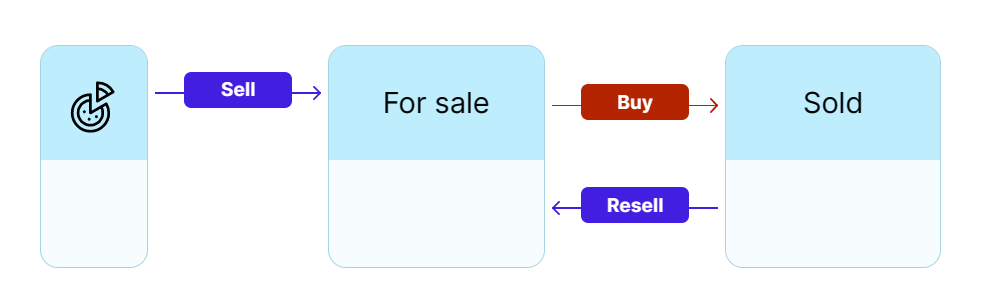
The spec if exported is as follows
Sketch NFT : Sketch :  : ;

Id : integer(),
Status : integer(),
Name : string(),
Price : money(),
Image : image(),
Description : string(),
Nft owner : address(),
Currency : string(),
Buyer : address(),
Old owner : address(transient=yes,),
Amount : string(transient=yes,),;

0:For sale:Nft owner,
1:Sold:;

'' => 'For sale' : Sell (Name,Description,Price,Image) + ASSERT_ACCESS(restricted=Nft owner);
'For sale' => 'Sold' : Buy () + PAY(Old owner, Price, transitioncaller) + ASSERT_ACCESS(restricted=Buyer);
'Sold' => 'For sale' : Resell ();
Import workflow
From the main screen it is possible to use Toolblox Spec to import a new workflow by clicking the 'Import Flow' at app.toolblox.net.